

How to Configure the Field Popup in PPOM?
📝 Note: This feature is available in the premium version of the plugin, which you can get from here.
The Fields Popup addon allows the PPOM meta fields to be displayed inside a popup on the product page.
🌐 Enable it for all PPOM products
To enable this feature for all PPOM products, follow these steps:
1. Navigate to WooCommerce > Settings > PPOM Settings.
2. Open the Fields Settings panel**.**
3. Tick the Enable Fields Popup option.

You can also edit the global label of the popup button and change the text and background color to correspond to your website's palette.
📌 Enable it for specific PPOM Products
Alternatively, you can enable the popup for specific products by navigating to Products and editing them individually. Inside the Product Data area, open PPOM Fields and enable the popup:
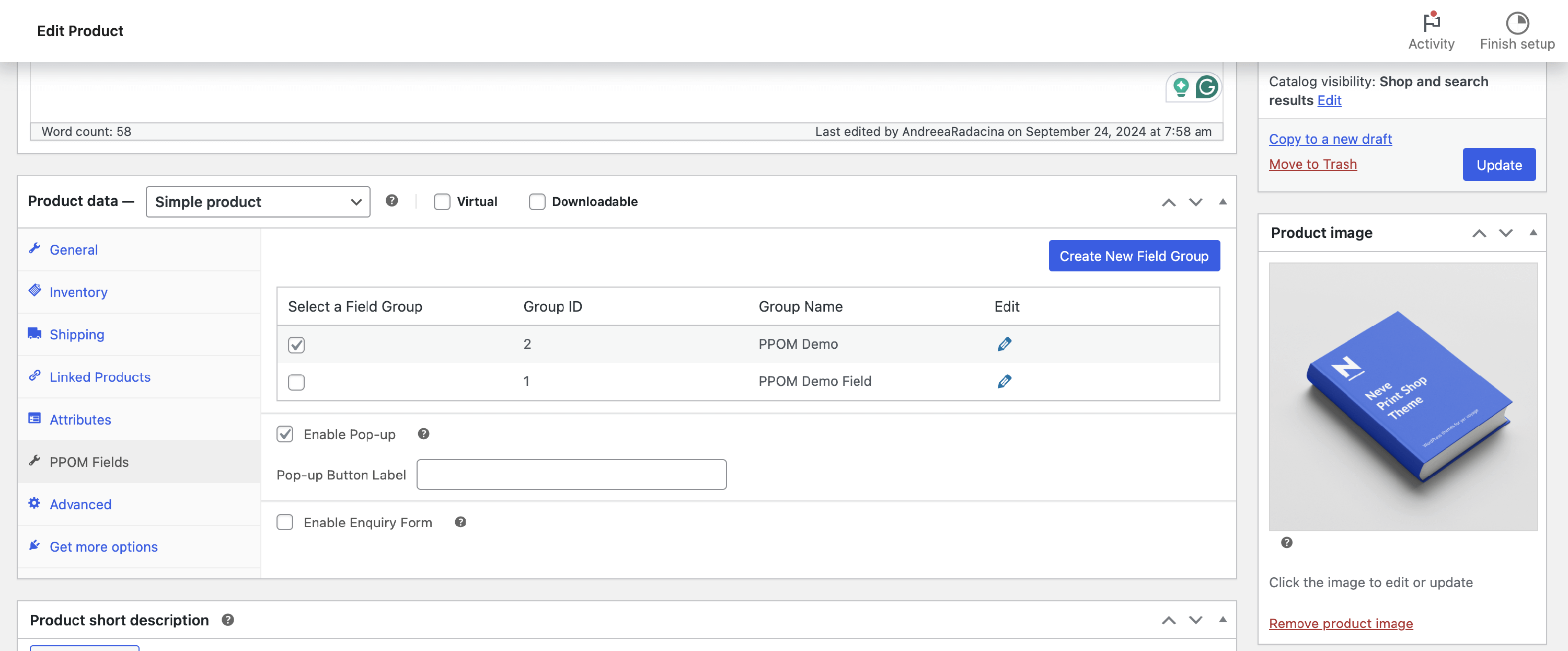
📝 Note: It will be applied only to products with PPOM input fields.
💡Result

Popup button on the product page

Popup opened