
Uploading Files
Prerequisites and Setup
- Any Media Library Organizer Pro license
- Follow the Setup Documentation to enable the Enable on Form Upload option
Overview
When uploading files, you can optionally specify the following attributes to apply to uploads:
- Title
- Alt Text
- Caption
- Description
- Media Categories
To specify any of these attributes:
Step-by-Step process:
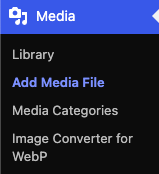
Click on Media > Add New in Wordpress Admin menu.
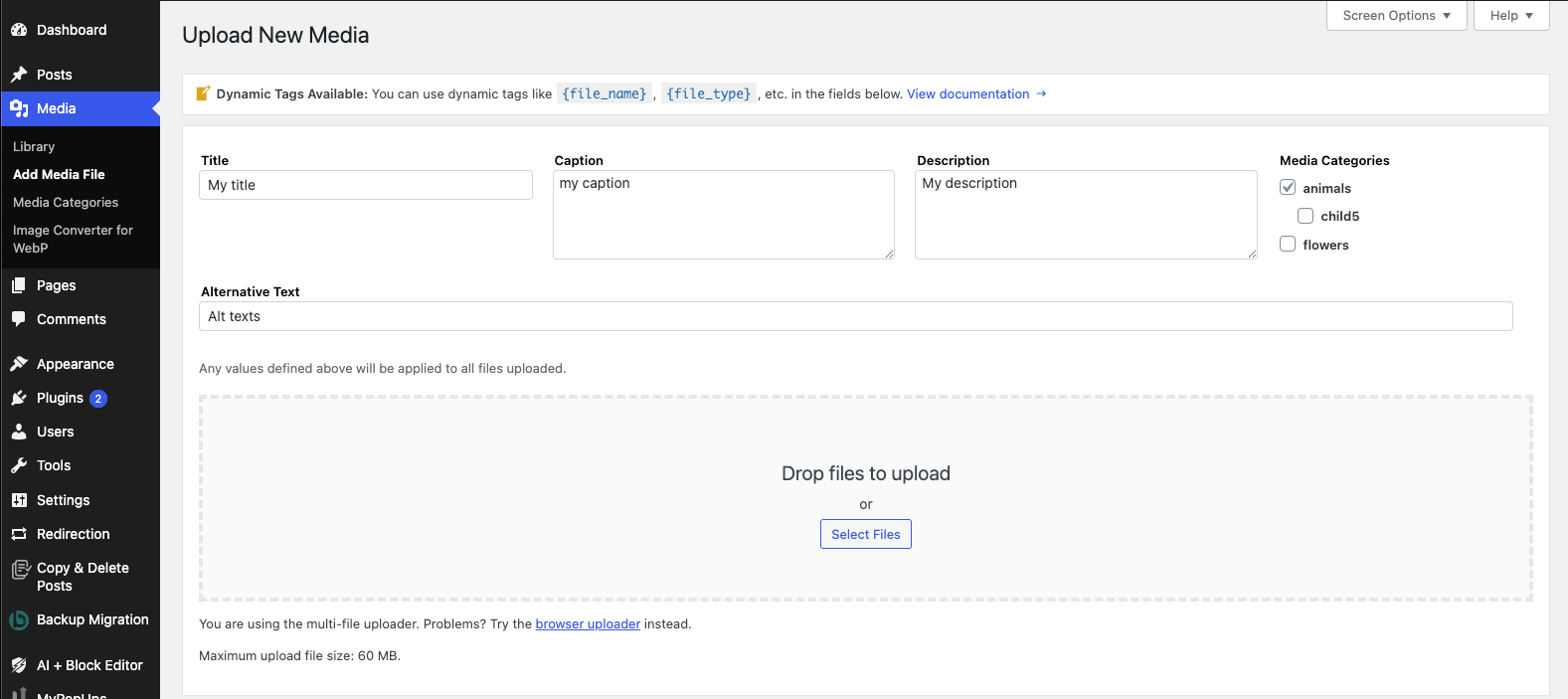
Before uploading file(s), specify the Title, Alt Text, Caption, Description and/or Media Categories in the form displayed above the file uploader.
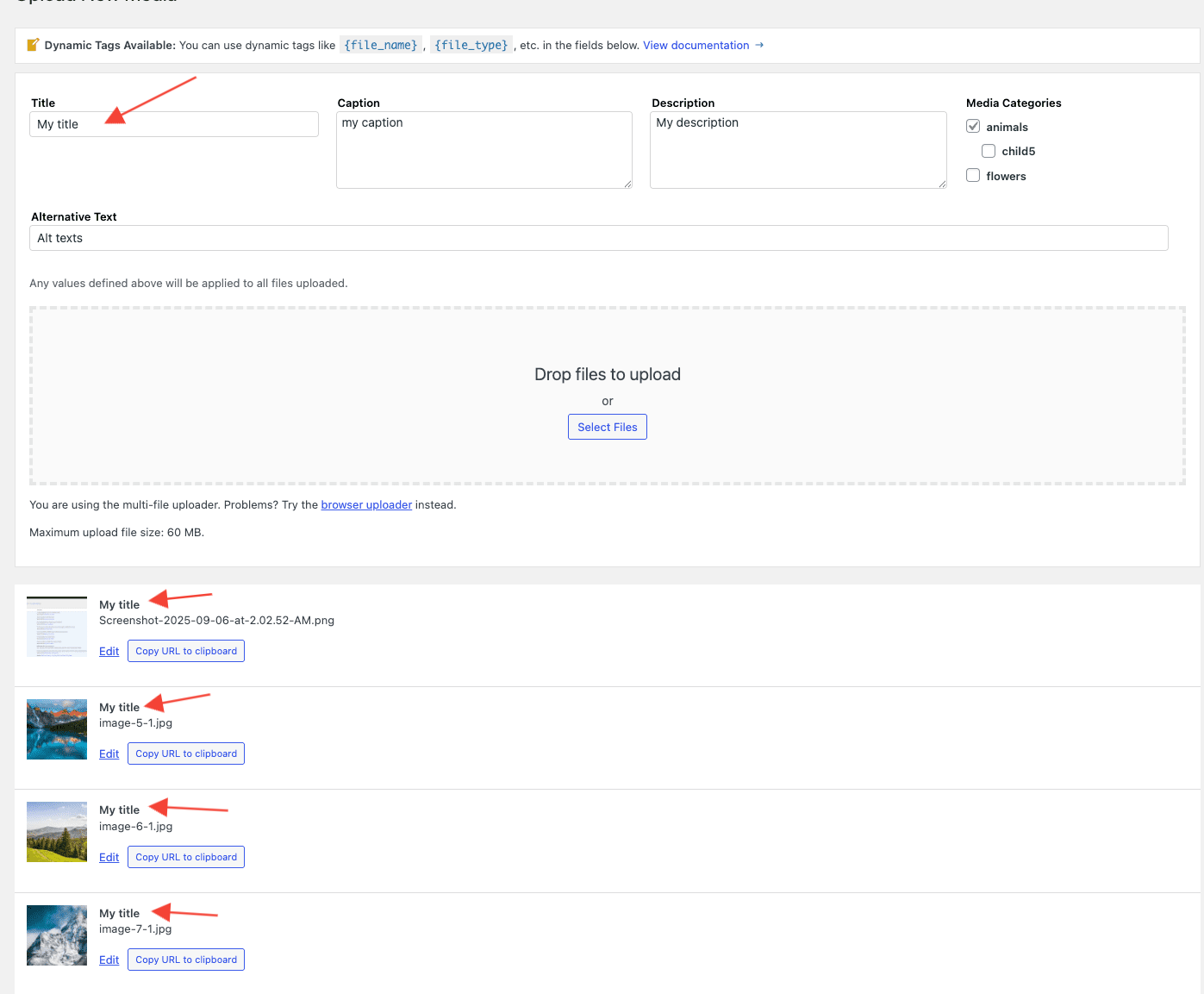
Upload your files in the normal way and your uploaded files will have the defined metadata saved.
Dynamic Tags
For the Attributes, excluding Media Categories, Dynamic Tags can be used. When used, these tags will be replaced by the file's information - for example, using {file_dimensions} will output the Image Width and Height as part of the attribute's value. To insert a tag:
- Start typing in the applicable Attribute field, and click the applicable Tag from the list

There's no limit to the number of Dynamic Tags that you use in an Attribute's value. The following Dynamic Tags are supported:
| Name | Tag | Description | Example |
|---|---|---|---|
| File Name | {file_name} | The File Name | my-filename.jpg |
| File Name, Prettified | {file_name_prettified} | File Name, with underscores and dashes replaced by spaces. Each word then has its first character converted to uppercase. | My Filename |
| File Extension | {file_extension} | File Extension | jpg |
| File Type | {file_type} | File Type | image |
| File Extension and Type | {file_mime} | File Extension and Type, separated by a forwardslash | image/jpg |
| File Size | {file_size} | File Size, denoted with either kb, mb, gb appended to it | 600kb |
| Image Width and Height | {image_width_height} | Image Width and Height, with the word pixels appended to it | 1024 by 768 pixels |
| Image Width | {image_width} | Image Width, with the word pixels appended to it | 1024 pixels |
| Image Height | {image_height} | Image Height, with the word pixels appended to it | 768 pixels |
| Uploaded Date | {uploaded_date} | The date when the file was uploaded, using the Date format specified at WordPress Admin > Settings > General > Date Format | July 29, 2020 |
| Uploaded Time | {uploaded_time} | The date when the file was uploaded, using the Date format specified at WordPress Admin > Settings > General > Date Format | 3:54pm |
| Uploaded Date and Time | {uploaded_date_time} | The date and time when the file was uploaded, using the Date format specified at WordPress Admin > Settings > General > Date Format | July 29, 2020 3:54pm |
Dynamic Tags: EXIF and IPTC
For images that might contain EXIF and/or IPTC data, the following additional Dynamic Tags are supported:
| Name | Tag |
|---|---|
| EXIF: Camera Make | {exif_camera_make} |
| EXIF: Camera Model | {exif_camera_model} |
| EXIF: Created Date | {exif_created_date} |
| EXIF: Created Time | {exif_created_time} |
| EXIF: Author | {exif_author} |
| EXIF: Comments | {exif_comments} |
| EXIF: Description | {exif_description} |
| EXIF: Title | {exif_title} |
| EXIF: Latitude | {exif_latitude} |
| EXIF: Longitude | {exif_longitude} |
| EXIF: Aperture | {exif_aperture} |
| EXIF: Focal Length | {exif_focal_length} |
| EXIF: ISO | {exif_iso} |
| EXIF: Orientation | {exif_orientation} |
| EXIF: Shutter Speed | {exif_shutter_speed} |
| EXIF: Flash | {exif_flash} |
| EXIF: Metering Mode | {exif_metering_mode} |
| EXIF: White Balance | {exif_white_balance} |
| IPTC: Object Name | {iptc_object_name} |
| IPTC: Edit Status | {iptc_edit_status} |
| IPTC: Priority | {iptc_priority} |
| IPTC: Category | {iptc_category} |
| IPTC: Supplemental Category | {iptc_supplemental_category} |
| IPTC: Fixture Identifier | {iptc_fixture_identifier} |
| IPTC: Keywords | {iptc_keywords} |
| IPTC: Release Date | {iptc_release_date} |
| IPTC: Release Time | {iptc_release_time} |
| IPTC: Special Instructions | {iptc_special_instructions} |
| IPTC: Reference Service | {iptc_reference_service} |
| IPTC: Reference Date | {iptc_reference_date} |
| IPTC: Reference Name | {iptc_reference_number} |
| IPTC: Created Date | {iptc_created_date} |
| IPTC: Created Time | {iptc_created_time} |
| IPTC: Originating Program | {iptc_originating_program} |
| IPTC: Program Version | {iptc_program_version} |
| IPTC: Object Cycle | {iptc_object_cycle} |
| IPTC: Creator | {iptc_creator} |
| IPTC: City | {iptc_city} |
| IPTC: State | {iptc_province_state} |
| IPTC: Country Code | {iptc_country_code} |
| IPTC: Country | {iptc_country} |
| IPTC: Original Transmission Reference | {iptc_original_transmission_reference} |
| IPTC: Headline | {iptc_headline} |
| IPTC: Credit Line | {iptc_credit} |
| IPTC: Source | {iptc_source} |
| IPTC: Copyright Notice | {iptc_copyright_string} |
| IPTC: Caption | {iptc_caption} |
| IPTC: Local Caption | {iptc_local_caption} |
| IPTC: Caption Writer | {iptc_caption_writer} |